

需求概述
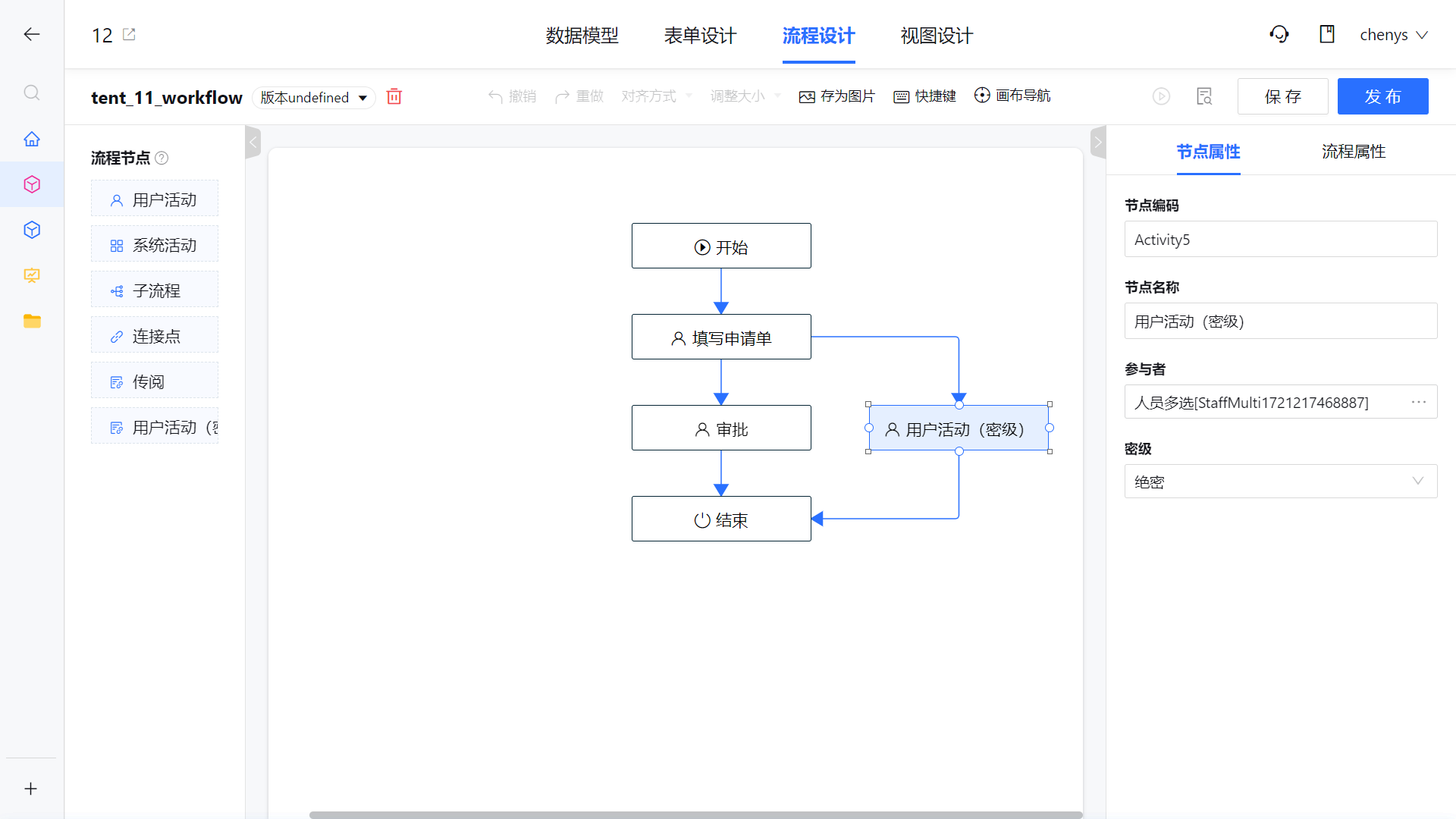
流程设计中新增加节点"用户活动(密级)",该节点的属性栏中只显示四个属性,节点名称,节点编码,参与人与密级。流程运转到该节点进行参与人计算时,需要根据节点上的密级属性配置与计算出的参与人密级字段进行二次过滤。
(人员密级信息由人员拓展字段提供数据)
前端扩展说明
一、节点扩展配置
扩展路径:packages\extension-template\src\workflow-design\extension-activities.ts
节点配置示例
import { ActivityTypes } from 'cloudpivot-admin-core/src/common/workflow-schema/typings/enums';

/**
 * 扩展节点
 */
interface ExtActivity {
  //节点中文名称
  activityName: string;
  //节点类型(继承自)
  activityType: ActivityTypes;
  //扩展节点类型(节点根据节点类型定位属性栏配置时,优先取扩展节点类型,其次才是节点类型)
  extendActivityType: string;
  //后端要求扩展属性得放在节点对象的属性extAttributes对象中,这里定义extAttributes对象的属性初始值
  extAttributes: any;
  // 节点图标,使用iconfont图标库,标识图标的unicode编码。如:
  // 云枢图标库demo文件地址:packages\builtin\cloudpivot-icons\src\demo_index.html;浏览器打开查看图标
  icon?: string;
  // 节点名称多语言对象
  name_i18n?: {
    en: string;
  },
}

/**
 * 扩展节点数组
 */
export const extActivities: ExtActivity[] = [
  {
    activityName: '用户活动(密级)',
    activityType: ActivityTypes.User,
    extendActivityType: 'CustomNode',
    extAttributes: {
      securityLevel: '0',
    },
  },
];
ExtActivity扩展节点对象中的可选属性若不进行定义,则跟继承的系统节点类型保持一致,例如:icon、name_i18n
注:extendActivityType项目已经使用,相关字段需前后端同步修改
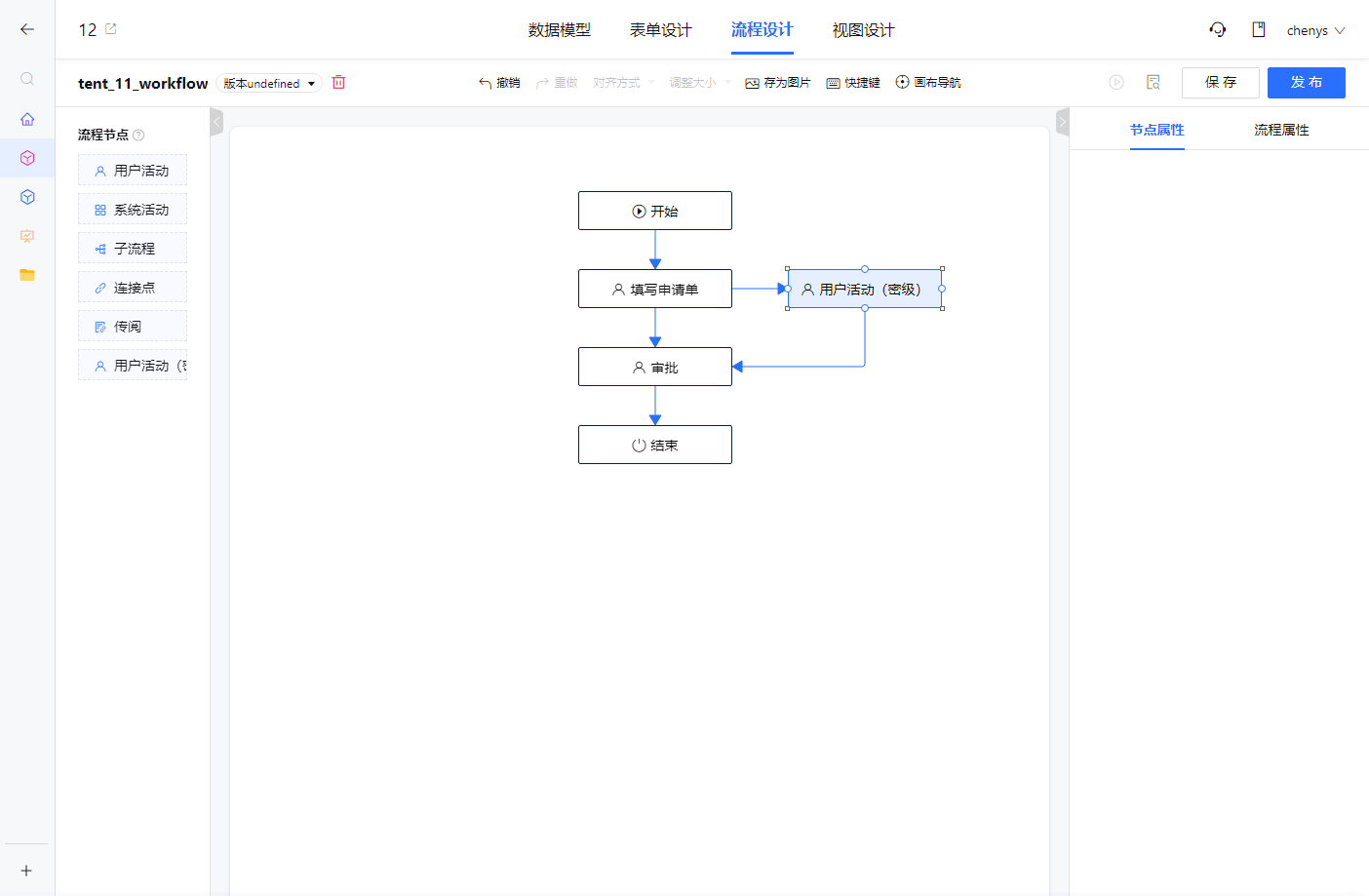
节点配置后运行效果
节点扩展配置完成后,会在流程设计左侧流程节点列表中增加一个扩展节点,此时还需要给节点配置相关属性
二、节点属性面板配置
扩展路径:packages\extension-template\src\workflow-design\attr-panel\extension-panel-example.ts
引用产品已定义属性
产品已定义的流程节点属性,可直接引用,例如:activityCode、activityName、participant等;
获取方式:attrPanelRegister.getAttr(节点类型, 属性code),例如:attrPanelRegister.getAttr(ActivityTypes.User, 'activityCode')
属性配置示例
import { PanelConfig } from 'cloudpivot-designer/property-panel';
import { attrPanelRegister } from 'cloudpivot-admin-core/src/components/apps/workflow-property/scripts';
import { ActivityTypes } from 'cloudpivot-admin-core/src/common/workflow-schema/typings/enums';

const panelExample: PanelConfig = {
  properties: [
    attrPanelRegister.getAttr(ActivityTypes.User, 'activityCode'),
    attrPanelRegister.getAttr(ActivityTypes.User, 'activityName'),
    attrPanelRegister.getAttr(ActivityTypes.User, 'participant'),
    {
      title: '密级',
      code: 'securityLevel',
      //输入组件名称
      inputComponentName: 'property-select',
      //输入组件的参数
      options: {
        selectOptions: [
          { label: '非密', value: '0' },
          { label: '内部', value: '1' },
          { label: '秘密', value: '2' },
          { label: '机密', value: '3' },
          { label: '绝密', value: '4' },
        ],
      },
      /**
       * 用户修改密级字段信息时,同步修改节点对象中扩展对象extAttributes下securityLevel属性的值
       **/
      valueMap: 'extAttributes.securityLevel',
    }
  ],
};

export default panelExample;
三、节点属性面板注册
扩展路径:packages\extension-template\src\workflow-design\extension-attr-panel.ts
import { attrPanelRegister } from 'cloudpivot-admin-core/src/components/apps/workflow-property/scripts';

import panelExample from './attr-panel/extend-panel-example';

attrPanelRegister.append('CustomNode', panelExample);
注册后运行效果
后端扩展说明
扩展示例代码
public class ExtParticipantFilterServiceImpl implements ParticipantFilterService {
    // autowires
    private UserFacade userFacade;
    private UserExtendFacade userExtendFacade;

    @Override
    public Set<String> doFilter(Set<String> participants, ParticipantProcessorContext context) {
        if (CollectionUtils.isEmpty(participants)) {
            return participants;
        }
        ConfidentialLevel confidentialLevel = getConfidentialLevel(context);
        if (confidentialLevel == null || confidentialLevel == ConfidentialLevel.NON_CONFIDENTIAL) {
            return participants;
        }
        List<String> userIdList = Lists.newArrayList(participants);
        List<UserModel> userModels = userFacade.listByIdList(userIdList);
        if (CollectionUtils.isEmpty(userModels)) {
            return participants;
        }
        UserExtAttrModel confidentialLevelAttr = userExtendFacade.getExtAttrByCorpIdAndCode("RELEVANCE-6cf4718787374570a0c583f939077e77", "confidentialLevel");
        if (confidentialLevelAttr == null) {
            return participants;
        }
        Set<String> filtered = Sets.newLinkedHashSet();
        List<UserUnionExtAttrModel> extAttrs = userExtendFacade.listUnionByUserIdListAndAttrIdList(userIdList, Lists.newArrayList(confidentialLevelAttr.getId()));
        if (CollectionUtils.isEmpty(extAttrs)) {
            return filtered;
        }
        Map<String, List<UserUnionExtAttrModel>> userId2ExtAttrs = extAttrs.stream().collect(Collectors.groupingBy(UserUnionExtAttrModel::getUserId));
        for (UserModel userModel : userModels) {
            List<UserUnionExtAttrModel> userExtAttrs = userId2ExtAttrs.get(userModel.getId());
            if (CollectionUtils.isEmpty(userExtAttrs)) {
                continue;
            }
            if (userExtAttrs.stream().anyMatch(e -> {
                ConfidentialLevel level = ConfidentialLevel.get(e.getMapVal());
                return level != null && level.getIndex() >= confidentialLevel.getIndex();
            })) {
                filtered.add(userModel.getId());
            }
        }
        return filtered;
    }

    private ConfidentialLevel getConfidentialLevel(ParticipantProcessorContext context) {
        Map<String, Object> extAttributes = context.getActivity().getExtAttributes();
        if (MapUtils.isEmpty(extAttributes)) {
            return ConfidentialLevel.NON_CONFIDENTIAL;
        }
        String securityLevel = (String) extAttributes.get("securityLevel");
        if (StringUtils.isBlank(securityLevel)) {
            return ConfidentialLevel.NON_CONFIDENTIAL;
        }
        return ConfidentialLevel.get(Integer.parseInt(securityLevel));
    }

    public enum ConfidentialLevel {
        /**
         * 非密、内部、秘密、机密、绝密
         */
        NON_CONFIDENTIAL("非密", 0),
        INTERNAL("内部", 1),
        CONFIDENTIAL("秘密", 2),
        SECRET("机密", 3),
        TOP_SECRET("绝密", 4);

        private final String name;
        private final int index;

        ConfidentialLevel(String name, int index) {
            this.name = name;
            this.index = index;
        }

        public static ConfidentialLevel get(int index) {
            for (ConfidentialLevel level : values()) {
                if (level.index == index) {
                    return level;
                }
            }
            return null;
        }

        public static ConfidentialLevel get(String name) {
            for (ConfidentialLevel level : values()) {
                if (StringUtils.equals(level.name, name)) {
                    return level;
                }
            }
            return null;
        }

        // getters..
    }
}
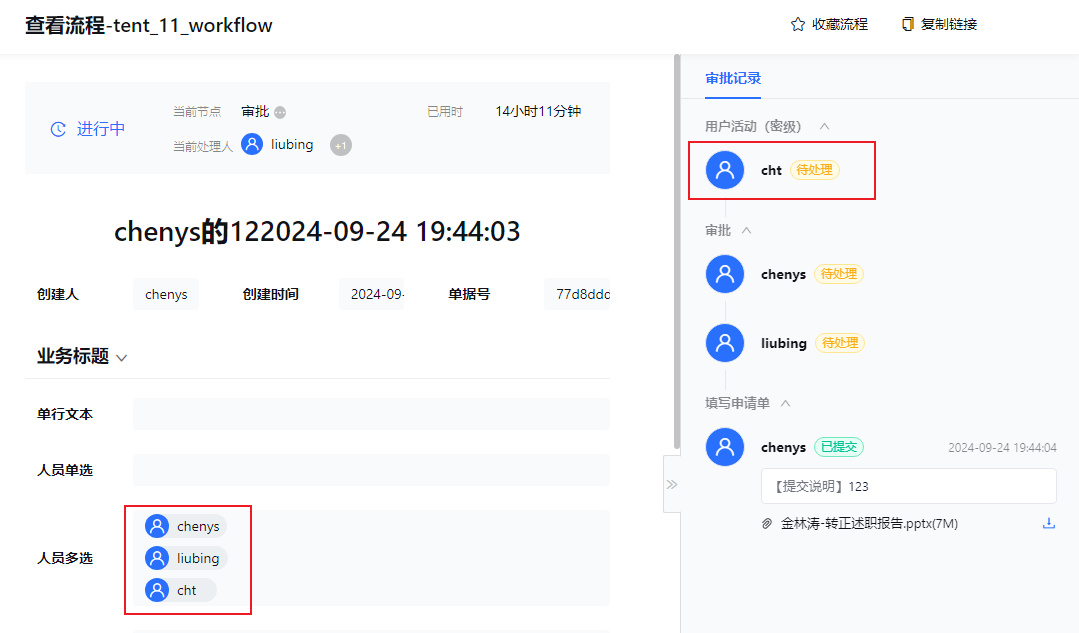
二次开发效果截图
表单详情
用户配置
Q&A
使用到的二开扩展能力
前端流程设计-流程节点扩展开发说明文档
前端流程设计-流程节点属性栏配置扩展开发说明文档
后端流程运行参与人函数扩展
流程属性栏注册器API
方法名称 | 说明 | 参数说明 |
append(panelCode: string, panelConfig: PanelConfig) | 添加新的属性栏配置 | 属性栏code,属性栏配置 |
replace(panelCode: string, panelConfig: PanelConfig) | 替换现有的属性栏配置 | 属性栏code,属性栏配置 |
replaceAttr(panelCode: string, attrConfig: PropertySchema) | 替换现有属性栏中的某个属性 | 属性栏code,属性配置(包含属性的code) |
appendAttr(panelCode: string, attrConfig: PropertySchema, groupKey?: string) | 在现有属性栏中追加新属性,分组编码可选,如果不传入分组编码则在最后一个分组中添加 | 属性栏code, 属性配置,分组编码 |
appendGroup(panelCode: string, groupInfo: any) | 在现有属性栏中添加分组 | 属性栏code,分组信息 |
getAttr(panelCode: string, attrCode: string) | 获取现有的属性栏中,某个属性的具体配置 | 属性栏code, 属性code |
属性配置properties释义
interface PropertySchema {
  //属性标题,如果不设置则表示不需要显示标题
  title?: string;
  //属性编码
  code: string;
  /**
   * 输入组件值的映射,如果只是简单通过code取可以不设置,如果是多个属性合并的场景,需要配置
   * 例如:code为a,b,c,valueMap为['a','b','c'],则输入组件的值为{a:1,b:2,c:3}
   **/
  valueMap?: string[] | any;
  //属性提示
  tips?: string;
  //输入组件名称
  inputComponentName: string;
  // 自定义的判空逻辑,如果不设置则默认为!!value
  isNotEmpty?: (value: any) => boolean;
  // 自定义的必填提示文案,如果不设置走默认文案逻辑
  getRequiredErrorMessage?: (controller, propertiesData) => string;
  // 必填以外的校验逻辑,校验后的提示文案
  getValueValidateErrorMessage?: (controller, propertiesData) => string;
  //默认值函数
  defaultValue?: (businessContext, propertiesData: any) => any;
  //弹窗组件是否需要显示删除确认弹窗
  showDeleteConfirm?: boolean | ((value: any) => boolean | Promise<boolean>);
  //弹窗组件删除确认弹窗文案
  confirmText?: string;
  //隐藏整个组件的判断函数,只支持简单场景,如果需要用到的数据在controller中,需要在subscription中处理
  hiddenFunc?: (propertiesData: any) => boolean;
  //属性值传递给组件时进行的映射
  inputValueTransform?: (value: any) => any;
  //组件值传递给属性时进行的映射
  outputValueTransform?: (value: any) => any;
  //组件的参数props
  options?: any;
}
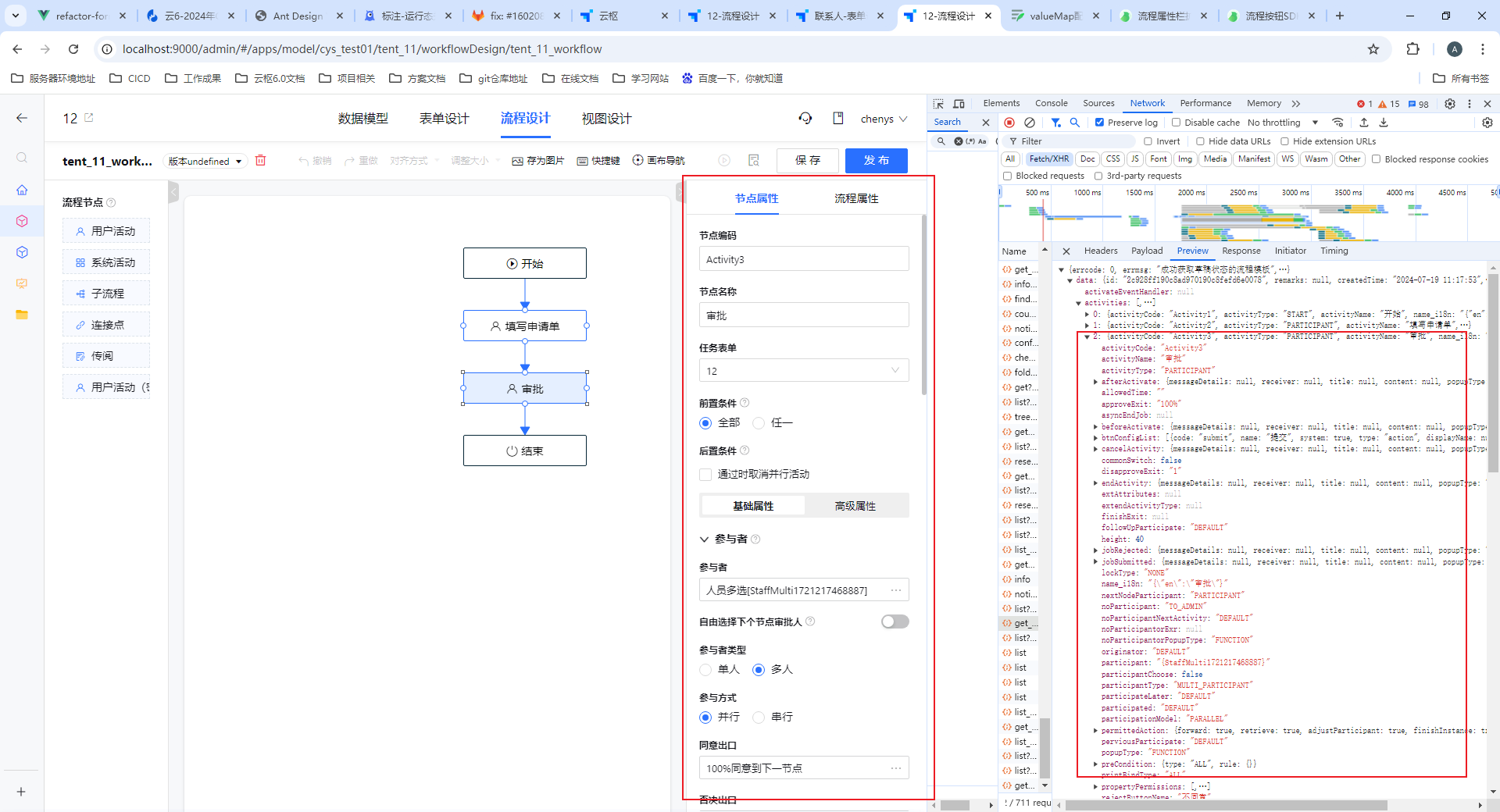
更多属性输入组件
-
有用(6)
-
没有用(0)

